May 232012
 

Recently a new customer reported sporadic AFP service crashes when sharing folders located on a Xsan volume.

First I want to give you a short overview
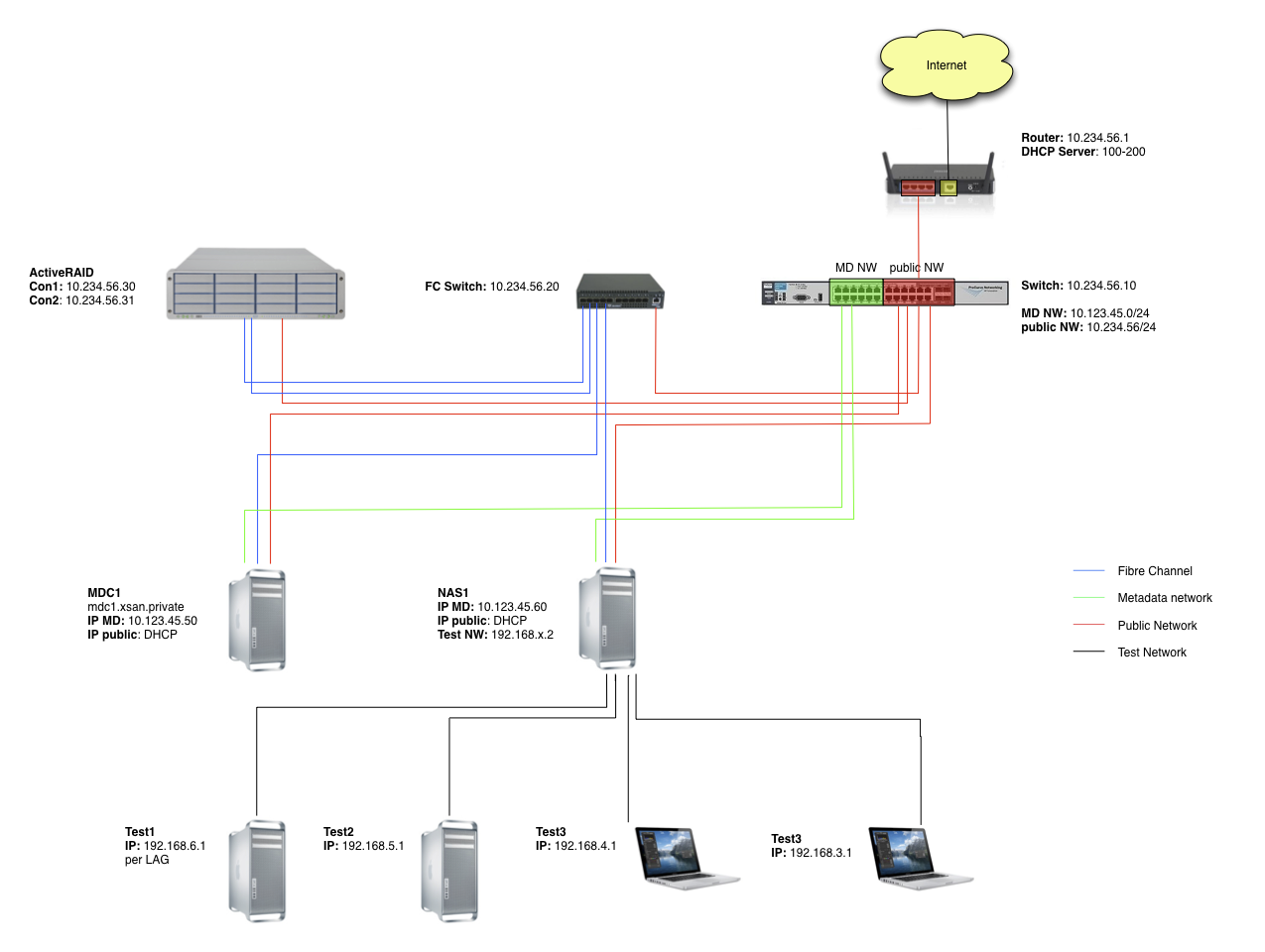
The client uses Mac OS X 10.6.8 in combination with Xsan 2.2.1. They have 2 MDCs and several NAS servers. The clients can access the Xsan volumes only through the NAS servers using AFP.

While this works great most of the time sometimes the AFP services crashes. After that the Mac clients don’t see the sharepoints any more. On the NAS server responsible for this share the SAN volume is still mounted but when trying to access it using Finder a crash occurs. It’s interesting that you are still able to browse the folders using ls in Terminal.app.

A temporary fix is to kill the AppleFileServer process!

After investigating further we discovered the following error messages:

5/21/12 1:23:05 PMmds[868] (Error) Server: Peer checkin failed -- no store for path '/Volumes/XSAN/Share'
5/21/12 1:23:05 PMcom.apple.AppleFileServer[837]MDSChannelPeerCreate: (os/kern) invalid argument

My partial explanation

These log messages are well known and documented on several webpages (1, 2). They are caused by a somehow inaccessible .fseventsd folder on the specific sharepoint. While this can be repaired quite easy on “normal” sharepoints it’s not that easy on Xsan volumes.

I have not been able to find the exact cause but I think it’s something like this:

  • A client connects to the AFP service.
  • The AFP server tries to connect to the Spotlight service of the specific volume
  • Spotlight queries the fseventsd subsystem of OS X
  • Something breaks while talking to fseventsd

A workaround

The problem can be “fixed” by disabling the MDS service. This can be archived either by unloading the launchd plist file or removing it entirely.

Temporary disable MDS (until reboot or reload)

sudo launchctl unload -w /System/Library/LaunchDaemons/com.apple.metadata.mds.plist

Disable MDS

sudo rm /System/Library/LaunchDaemons/com.apple.metadata.mds.plist

Attention: Stopping the MDS service will completely disable Spotlight
May 072012
 

Today I had a few hours spare time, so I took a look at SIMBL.

SIMBL is a small framework to inject your own code into Cocoa applications. A similar system is used by the super awesome TotalFinder and TotalTerminal.

The Google Code project page includes a very short tutorial on how to create such a SIMBL bundle. First I thought it can’t be that easy – but it definitely is!

Just create a new Xcode bundle project and update the Info.plist file according the given specification:

<key>SIMBLTargetApplications</key>
<array>
        <dict>
                <key>BundleIdentifier</key>
                <string>com.apple.Safari</string>
                <key>MaxBundleVersion</key>
                <string>412</string>
                <key>MinBundleVersion</key>
                <string>412</string>
        </dict>
</array>

After that add the following “callback” methode to your projekt:

+ (void) load {
        // your code
}

That’s it! Now do whatever you want to do 😉
To test your bundle just copy it to one of the following folders …

/Library/Application Support/SIMBL/Plugins
/Users/Username/Library/Application Support/SIMBL/Plugins

… and start the application. SIMBL will take care of loading the correct plugin (by checking the bundle identifier) and calls your load method.

Apr 162012
 

Recently I installed Archiware’s PresStore at a local university and had a very strange problem.

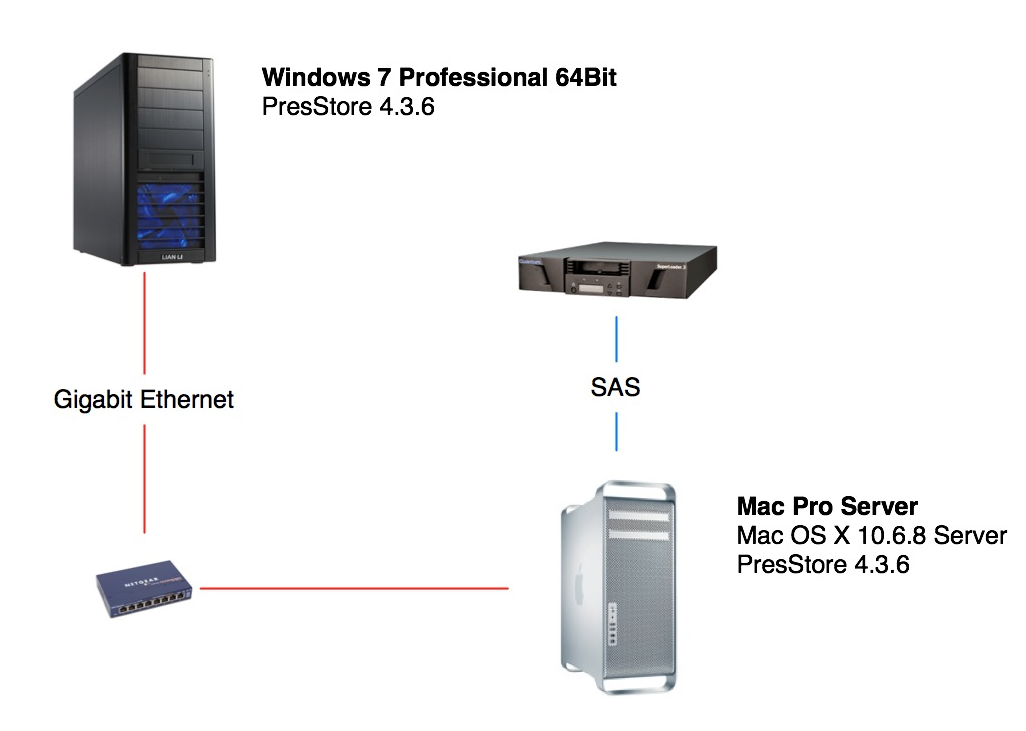
First of all I want to give you an overview

Mac Pro & Quantum Superloader 3

The Mac Pro is the main component of the backup and archive workflow. It is used to configure all the jobs and saves them to LTO5. During my tests I used a file based library.

PC

The PC is used to produce audio files. The problem is that on the PCs multiple backup copies of an unchanged file are created while using PresStore’s backup feature.

My proceeding

Reading the support documents

First I search around in Archiware’s knowledgebase and found the article titled “Why does PresSTORE sync or backup a file once more?

With the help of this I enabled logging – then created the following workflow to reproduce the problem:

How to reproduce

On the local drive D: I created a new folder and on the Mac Pro server I added a new backup job (including a new file based library as destination) for this folder.

Whenever I added a file to the folder and started the job the new data was successfully copied – everything worked as expected.

But if I started the same job again without modifying the folder (not even touching it) the file gets copied again – therefore a lot of space on the tapes is wasted.

Here’s the interesting part of the log:

[13/Apr/2012:16:30:05][3764.10f4][-fwlkt:10f4-] Dev: BcxIndex: NEW entry /D/test/file.zip
[13/Apr/2012:16:31:23][3764.9f0][-fwlkt:9f0-] Dev: BcxIndex: UPD ctime (1334327405 > 1334327400) /D/test/file.zip

What’s going wrong

At first I thought that a third party application is changing the file so I used Process Explorer to capture all events. – But to my surprise no access to the file was captured!

Possible solution 1

In the end I gave up and contacted the support. They replied very fast and reported that this problem is caused by a “feature”.

Windows does not have a real ctime file information – sometimes when a file attribute is changed the modification date is not updated but the archive flag is set. Therefore a file with a set archive flag is backed up twice!

To work around this behavior you have to enabled “Scan files before backup” in the “Additional options” of the specific backup job.

Here’s a video of this solution

Possible solution 2

The support also told me about a second possibility: disabling the ctime check on the server.

This is done by adding the following lines to the configuration file /usr/local/aw/conf/lexxsrv.8000

ns_section ns/server/$server/module/bixindex
ns_param testInodeChangeTime 0

As this change disables the ctime check completely on all clients there are some sideffects. Therefore the following changes will NOT trigger an incremental backup:

  • extended attributes are changed (Mac)
  • POSIX and ACL permission change (Mac)
  • file attributes (Windows)
  • streams (Windows)
  • permissions (Windows)

Full backups and content changes still backup the file!

Apr 162012
 

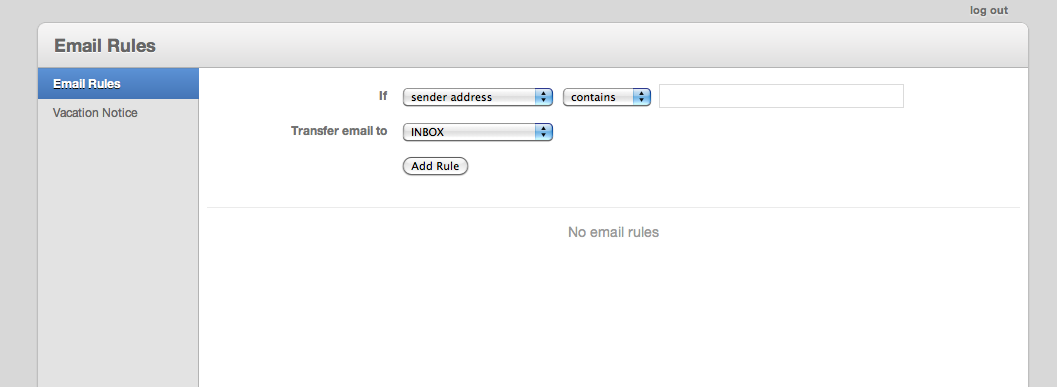
Mac OS X Snow Leopard Server features a new interface to setup automatic replies and server-side mail rules.

It’s super easy to use while still covering 90% of the daily needed features – but it lacks the possibility to forward mails to a user supplied address.

To work around this issue you need another interface for creating sieve scripts. In the end the best (at least for me) solution to this problem is to add the functionality to the webmail interface – either SquirrelMail or Roundcube.

Robert wrote a great tutorial on this topic – Here’s an archived version.

Mar 092012
 

Just a short list with some useful tipps for installing a new Microsoft SBS 2011 Server.

Mar 092012
 

I often have to migrate mailservers therefore it’s important for me to have a tool like imapsync.

Imapsync, as the name suggests, is used to sync a source and a destination imap mailbox. It’s highly customizable and can be scripted using the powerful command line interface.

I don’t want to write a full tutorial (see herehere or here) but instead give you a short overview.

Requirements

Simple usage overview

imapsync --host1 imap.truc.org --user1 foo --password1 secret1 --host2 imap.trac.org --user2 bar --password2 secret2

For further information see the man page.

Problems

This is the most important part of this posting. Here I will list problems that I encountered.

imapsync quits in the middle of a synchronization

This is most likely caused by a broken Mail::IMAPClient library. Try to download a (newer) version here and include it using perl’s “-I” command line parameter

“xx BAD Command Argument Error. 11” is printed

I had this problem once using an Exchange 2011 as the destination. It means that the current message exceeds the maximum message size. See this post for how to fix it.

Mar 062012
 

Today I migrated a Microsoft SBS 2003 Server to a VMware ESXi 5.0 host.

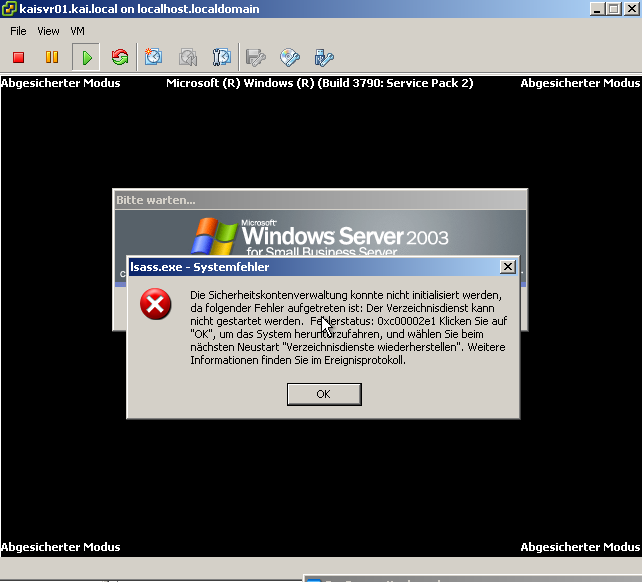
At first I tried to convert the running server using the VMware vCenter Converter. It finished quite fast (~40GB in half an hour) over gigabit ethernet and even booted up. But instead of showing the login form, it reported, that the ActiveDirectory could not be started. I tried all the suggested solutions provided by Microsoft’s knowledge base article (KB240655) without success.

Then I used Seagate’s DiscWizard from the Hiren BootCD to create an Acronis disk images and migrated it using the converter. At first it estimated over 5 hours, so I changed some settings (nothing really special) – the next try took only 30! minutes. Additionally this time no error showed up and everything worked as expected!

Fazit: Always do an offline migration – it will save you hours!

Mar 012012
 

We always use QLogic Fibre Channel Switches for our SAN installation. These switches have some options to increase throughput and decrease spikes during large file transfers, namely I/O Stream Guard and Device Scan.

It’s quite important to set this options correct for a good overall performance of the SAN regardless of the used software (XSan, metaSAN, HyperFS, …).

Here’s what you have to use:

Initiators (your clients)

I/O Stream Guard: Enabled
Device Scan: Disabled

Target (your RAIDs)

I/O Stream Guard: Disable
Device Scan: Enabled

Apple also posted a KB article a few years ago about this topic.

Feb 262012
 

Recently we switched over to VMware ESXi 5.0 for all our new Windows Server installations.

For my first installation I have chosen an HP ProLiant ML350 G6.
After looking up the specs and checking with VMware’s Compatibility Guide everything looked quite straight forward. After installing the machine at the client they started to complain about very very low system performance.

After doing some tests I found the problem at the I/O performance of the RAID 1. Googling around showed up a not widely known problem regarded a not installed RAID controller battery backup (BBWC). After getting the “missing” part and finishing the first loading cycle (which took about 2 hours) everything went back to normal!

Always get a BBWC for your P410i controllers when you want to use VMware ESXi

Feb 212012
 

Mac OS X allows hardlinks on directorys (see stackoverlow) but this has two limitations:

  1. as all hardlinks they work only on one partition
  2. it’s not really supported

With the help of osxfuse and bindfs you can bind a directory to a different folder – like the way you would do it on every other unix based system.

PS: Here’s my patched version (only useful to me): bindfs-1.9