Sep 282014
 

Buried deep within the network stacks of all major operating systems there are two TCP extensions called Nagle’s Algorithm and Delayed ACKs. Both aim to relieve the pressure on networks (read: the Internet) by changing the way TCP acknowledgements work. This article focuses on the quirks that occur on OS X while doing real-time video editing.

Before we start it is important to note that these extensions are very important and should NOT be disabled:

Please note that while, in certain cases, the current Nagle algorithm can
have a negative performance impact for certain applications, turning OFF the
Nagle algorithm can have a very serious negative impact on the internet. ~Greg Minshall on the ietf-discuss w3.orf mailing list

Furthermore the source of most Nagle’s Algorithm related problems has already been fixed several years ago. Please check out Rolande’s blog [1,2] and the article “TCP Performance problems caused by interaction between Nagle’s Algorithm and Delayed ACK” by Stuart Cheshire for useful background information.

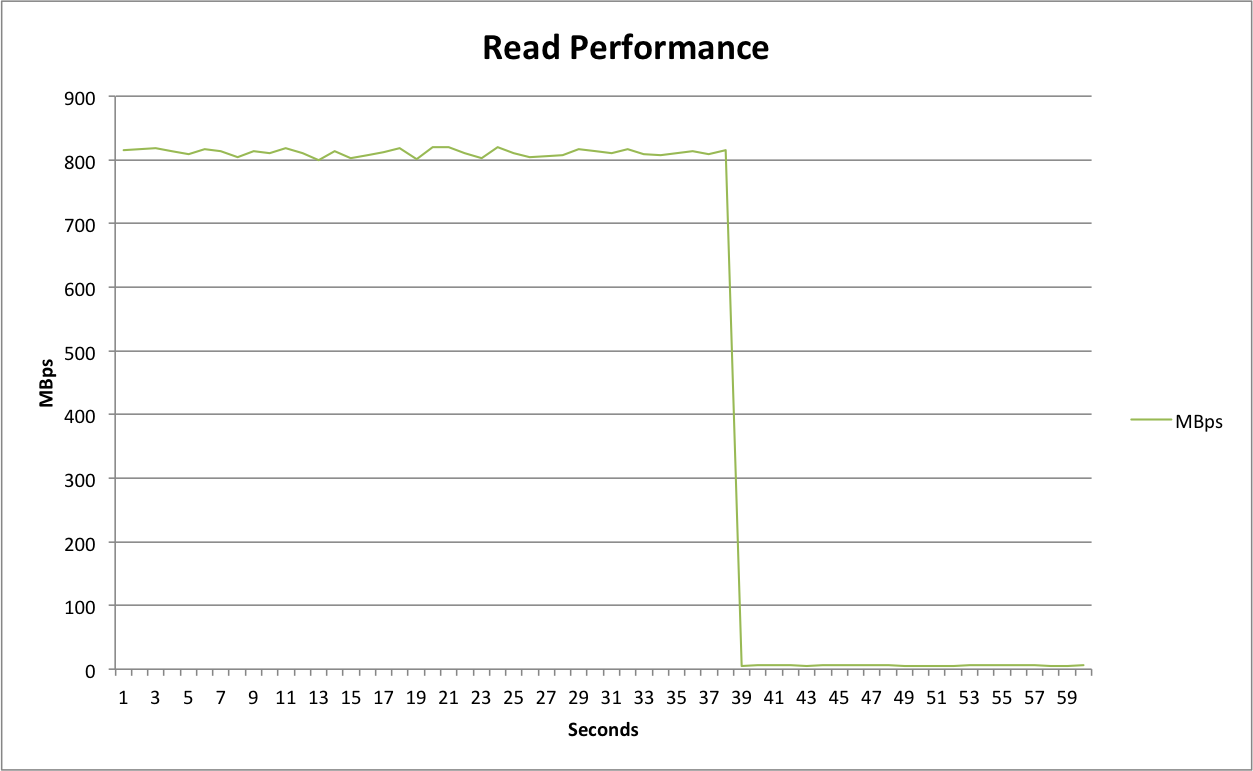
This post is based on problems reported by some of our flow:rage customers using OS X and 10Gbit Ethernet. They reported things like dropped frames in Final Cut Pro 7 or increased render times within Adobe Media Encoder. These issues were sometimes easily reproducible (like encoding a file twice) and sometimes they appeared and disappeared at will. They were caused by the read performance over the network dropping to only a few MBps – writes were not affected and still performed as expected. The graph below illustrates the observed performance drop:

Performance

To fix the performance issue it was necessary to disable Nagle’s Algorithm and to switch Delayed ACK to it’s compatibility mode. To do so I used the following Terminal command based on the documentation found in this post. As this is only a temporary change you still have to edit /etc/sysctl.conf for a permanent solution as explained in SmallTree’s KB.

sudo sysctl -w net.inet.tcp.delayed_ack=2

I invested quite a lot of my time in researching and writing down all of this information. I hope this post helps people to understand what Nagle’s Algorithm and Delayed ACKs are used for and that they are generally very important and useful extensions. However there are always exceptions and in this case it looks like 10Gbit Ethernet on OS X is one of those …

Sep 082014
 

Last week a local customer reported strange problems with his EMC Isilon storage. For example sometimes when they copy a file from Mac A to their central storage they can’t see it on Mac B. Only Macs are affected by this strange behaviour – all their PCs work great. I was happy when they booked an on-site appointment to investigate the problems further.

I started the investigation by talking to all the people there and writing down all the issues.
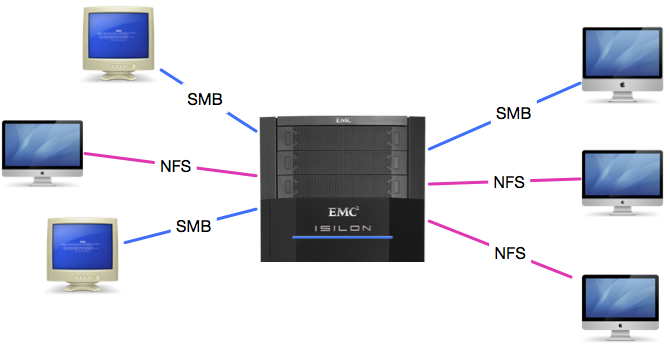
After summarising I found out that most of the issues where caused by the fact that they mixed SMB and NFS.
I discussed this with the customer and he happily agreed to switch all machines to SMB.
Isilon

However we still had one issue to solve: Some files (those with umlauts in their filename) where only visible over NFS. The following blog post is a summary of my on-site procedure and my findings:

1.) File Creating with Umlauts over NFS3

If you create a file with umlauts in it over NFS3 (tested with MS Word) it can’t be opened over SMB (“Das Programm kann nicht gefunden werden”). It still works over NFS. You are unable to delete the EAs (._ Files) over SMB (“No such file or directory”).

After removing the EA files over NFS, MS Word launched but complained about an illegal filename. I was furthermore unable to read the file (“no such file or directory”) using cat – however it was still working with NFS.

2.) File Creating with Umlauts over SMB

Same problem as above! The file could not be accessed using NFS – everything working as expected over SMB. Furthermore SMB supports alternate data streams -> EAs get lost between protocols. It this case it is somewhat good that they are enabled as it would break QT7 otherwise.

3.) File Creating without Umlauts

Everything works fine if there is no umlaut in the filename.

4.) Files are not shown within Finder

In Terminal you can see them using ls. This is related to the EA ._ metadata files! If a file has EA’s they disappear if Finder is unable to access those. This is the reason why some movies with umlauts in their name are hidden. If you delete the ._ files they reappear – but are still inaccessible.

5.) Word sometimes unable to save files with Umlauts?

“Word kann dieses Dokument aufgrund eines Bennenungs- oder Berechtigungsfehlerd nicht auf dem Zielvolume schreiben”

6.) Verification

Based on that knowledge I used the following procedure to locate the problem: I created a file with QT X (test.mov) on the storage. Then I duplicated it and renamed to either “NFS aaaÜ.mov” and “SMB aaaÜ.mov” over the corresponding protocol. Thereby two files were created.

Then I ran the following hexdump commands:

NFS Test File

MBP:Test3 user$ ls /Volumes/Broadcast/Test/Test3/NFS*|hexdump -C #over SMB
00000000  2f 56 6f 6c 75 6d 65 73  2f 42 72 6f 61 64 63 61  |/Volumes/Broadca|
00000010  73 74 2f 54 65 73 74 2f  54 65 73 74 33 2f 4e 46  |st/Test/Test3/NF|
00000020  53 20 61 61 61 55 cc 88  2e 6d 6f 76 0a           |S aaaU...mov.|
0000002d
MBP:Test3 user$ ls /Volumes/broadcast-1/Test/Test3/NFS*|hexdump -C #over NFS
00000000  2f 56 6f 6c 75 6d 65 73  2f 62 72 6f 61 64 63 61  |/Volumes/broadca|
00000010  73 74 2d 31 2f 54 65 73  74 2f 54 65 73 74 33 2f  |st-1/Test/Test3/|
00000020  4e 46 53 20 61 61 61 55  cc 88 2e 6d 6f 76 0a     |NFS aaaU...mov.|
0000002f

SMB Test File

MBP:Test3 user$ ls /Volumes/Broadcast/Test/Test3/SMB*|hexdump -C #over SMB
00000000  2f 56 6f 6c 75 6d 65 73  2f 42 72 6f 61 64 63 61  |/Volumes/Broadca|
00000010  73 74 2f 54 65 73 74 2f  54 65 73 74 33 2f 53 4d  |st/Test/Test3/SM|
00000020  42 20 61 61 61*55 cc 88* 2e 6d 6f 76 0a           |B aaaU...mov.|
0000002d
MBP:Test3 user$ ls /Volumes/broadcast-1/Test/Test3/SMB*|hexdump -C #over NFS
00000000  2f 56 6f 6c 75 6d 65 73  2f 62 72 6f 61 64 63 61  |/Volumes/broadca|
00000010  73 74 2d 31 2f 54 65 73  74 2f 54 65 73 74 33 2f  |st-1/Test/Test3/|
00000020  53 4d 42 20 61 61 61*c3  9c*2e 6d 6f 76 0a        |SMB aaa...mov.|
0000002e

Thereby I found out, that there is a different filename reported if you are using SMB. I marked the corresponding changes with an *. What that means it, that there are character encodings issues.

7.) The Issue: NFS

To test if the issue was related to their Isilon I repeated the test on a Debian VM. It shows the same strange issues. Thereby I conclude that the issue is caused by OS X’s NFS client and Finder. A possible way to reproduce this is to rename a file using terminal:

mv "/Volumes/NFSServer/testfile.mov" "/Volumes/NFSServer/testfileäöü.mov"

The expected behaviour is, that the file testfile.mov got renamed to testfileäöü.mov. While exactly that happened, the file got inaccessible. You cannot open it anymore.

9.) Next Steps

To fix this issues we recommend the following next steps:

  • Switch all machines to SMB – Thereby pretty much all problems should be fixed automatically.
  • To finalise the migration we have to fix the remaining issues:
    • We need a script that deletes all ._ EA files
    • Than we have to check if we can access all files containing umlauts. If not we have to rename them to work again (rename to some temporary name over NFS and rename back using SMB) This is the hard part, as we have to preserve the umlauts. Thereby we may be able to avoid the need to relink all assets.

If you have the same problem and need help see the About Me page for contact details.
Aug 312014
 

This blog post is first of all a reminder for myself as I often have to rerun the preview generation within Archiware P5 to test my custom preview generator PresSTORE Media Converter 3. The procedure it also described in this knowledgebase entry and the official CLI documentation. The command returns the ID of the verify job.

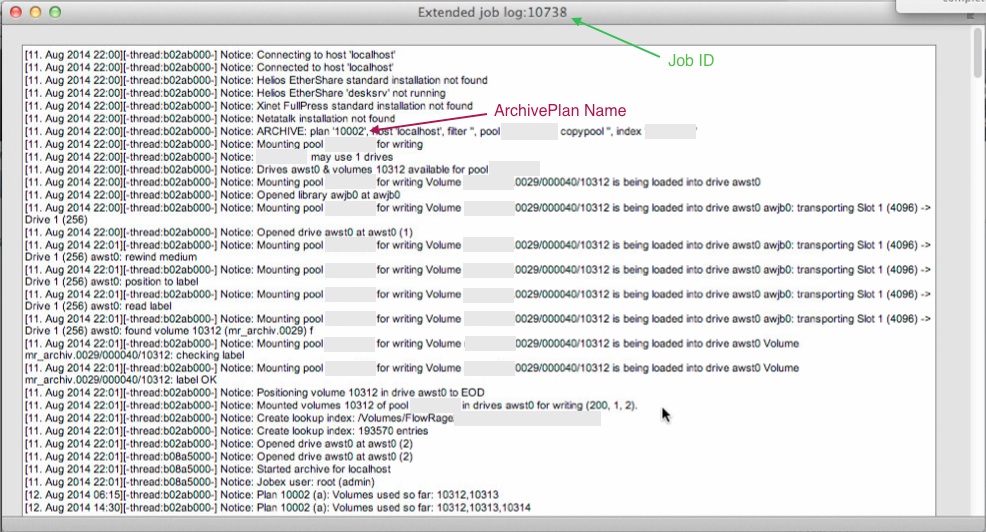
/usr/local/aw/bin/nsdchat -c "ArchivePlan <ArchivePlan Name> verify <Client> <Job ID>"

All the needed information can be found in the extended log of the original archive job. The naming of the ArchivePlan Name placeholder is a bit ought as you have to provide the ArchivePlan ID instead.

Extended Archive Log

For this example the following command is the correct one:

/usr/local/aw/bin/nsdchat -c "ArchivePlan 10002 verify localhost 10738"

Be aware that all the original files still have to be located at the original archive path. If they were already deleted you have to restore them first.

Aug 262014
 

We have a client that uses Final Cut Pro 7 on several Mac Pros running Mavericks to edit and capture videos on our flow:rage video storage. They are working with SD material encoded as either IMX 50 or ProRes. They reported that sometimes after stopping the capture within Final Cut Pro 7 using the ESC key the newly created video would not show up.

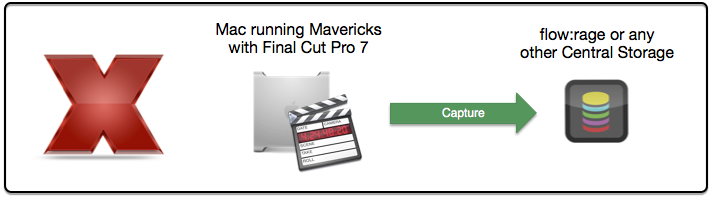
After hours trying to reliable reproduce the issue I gave up. What I can say is that some capture files (like 1 in 20) stop to grow during the ingest on network volumes. No log entries are created. I think that the network connection or the network stack within the kernel stalls. All network protocols tested (AFP, SMB and NFS) suffered the same problem on multiple servers. The temporary capture file with the “-avpostfix stays within the destination folder with a broken and presumably unrecoverable QuickTime header.

FCP Capture

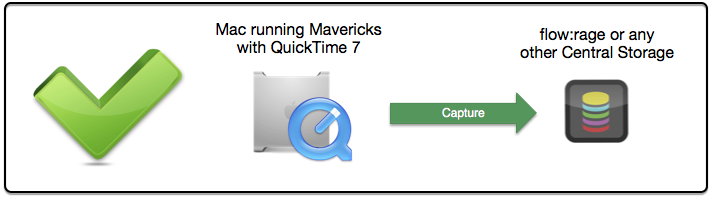
I further discussed the issue with the main developer of just:in, ToolOnAir’s ingest solution. He confirmed that just:in successfully uses the QuickTime 7 API to write IMX and ProRes encoded video files to network storages.

QT7 Capture

As the underlying QuickTime 7 API is still working as expected I conclude that this issue is another bug affecting Final Cut Pro 7 under Mavericks. I worked around this problem by creating a local watchfolder that moves the captured file automatically to the flow:rage.

Aug 172014
 

Over the last weeks we migrated one of our post production customers from Mac OS X Snow Leopard to OS X Mavericks and from Final Cut Pro 7 to Adobe Premiere Pro CC 2014. Furthermore we added a flow:rage as their central video storage to simply their workflows as they used to share their projects from Mac to Mac. However as they still had to access their old projects we also installed Final Cut Pro 7 on Mavericks. In theory Final Cut Pro 7 is still somewhat supported however there are some glitches here and there. This is the story about one such glitch that makes Final Cut Pro 7 almost unusable for our customer…

FCP-and-Network-Shares

After we finished the migration the cutters reported dropped frames in Final Cut Pro 7. Over time we were able to nail the problems down to projects that were opened over the network from a different Mac. If the projects were located on the flow:rage everything was working great. Based on that we tested the throughput of the hard disks and the network, checked the CPU and memory usage, used different network protocols and examined all logs on both the client and the server. However we couldn’t find the source of the problem!

We then tried to reproduce the problem at several other customers that still use Final Cut Pro 7 and to our surprise we could do so sometimes. What that means is that there can be problems with Final Cut Pro 7 on Mavericks if you try to edit over the network from Mac to Mac. This is especially true if there is a lot of traffic on the corresponding network interface. We never had any problems with projects stored on flow:rage storage system. In the end we suggested the customer to copy all projects to either the flow:rage or the local disk. No further dropped frames where reported.

I think the problem is a combination of a high kernel task utilisation caused by the network traffic, the fact that Final Cut Pro 7 was not extensively tested by Apple and some change in the VFS layer. For me it’s not worth to invest more time to further diagnose the problem. If you have any further hints please leave a comment.

Aug 122014
 

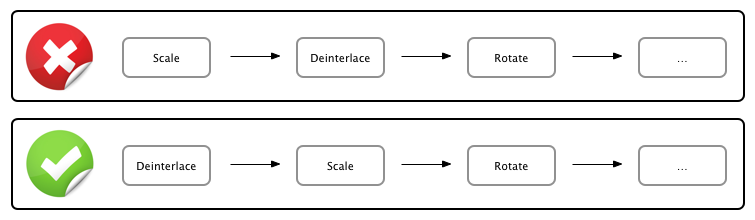
Last week I had to build a watchfolder that converts an interlaced input movie to an H264 proxy using FFmbc. It took me quite some time to figure out that if you scale an interlaced video (with the scale filter) it automatically gets converted to progressive in this step. However as I further had to deinterlace it (with the yadif filter) this caused me some problems. This Google Search revealed a lot of useful information.

Scale Deinterlace

In the end I learned that whenever you work with FFmbc or FFmpeg on interlaced material that has to be deinterlaced you have to do that with the first filter. Here’s an example:

ffmbc -i Interlaced_Input.mov -vcodec libx264 -acodec aac -strict experimental -b 5120k -vf "yadif,scale=720:576" -y H264_Output.mp4

Happy Deinterlacing!

Aug 072014
 

Currently I’m confronted with a lot of ignorance around LTFS. This is interesting as there are some very good resources [1,2] on what LTFS is good at and what should be solved using a dedicated backup or archiving application (like Archiware P5).

If you want to use LTFS consider the following best practice rules:

  • LTFS is good at transporting data – Archiving is hard as there is no real index database
  • LTFS should be used like a WORM (Write Once Read Many) tape
  • The bigger the files the better as small files have a horrible performance
  • If you only want to access files mount the tape read only to this increases the performance
  • Don’t force nonsequential tape operations with things like browsing a folder in thumbnail view
  • Try to only access top level folders (copy those folders to or from tape)

If you still think LTFS is the right solution for you go ahead and use it! On OS X most vendors [for example: Tandberg, HP] ship the same FUSE based filesystem and a small manager application. The following video gives a not so short introduction on how to use it:

Aug 062014
 

In this post I want to show how to convert movies encoded as MPEG IMX using ffmbc. It’s important to note that this is not working with FFmpeg at the time of writing as IMX was not supported.

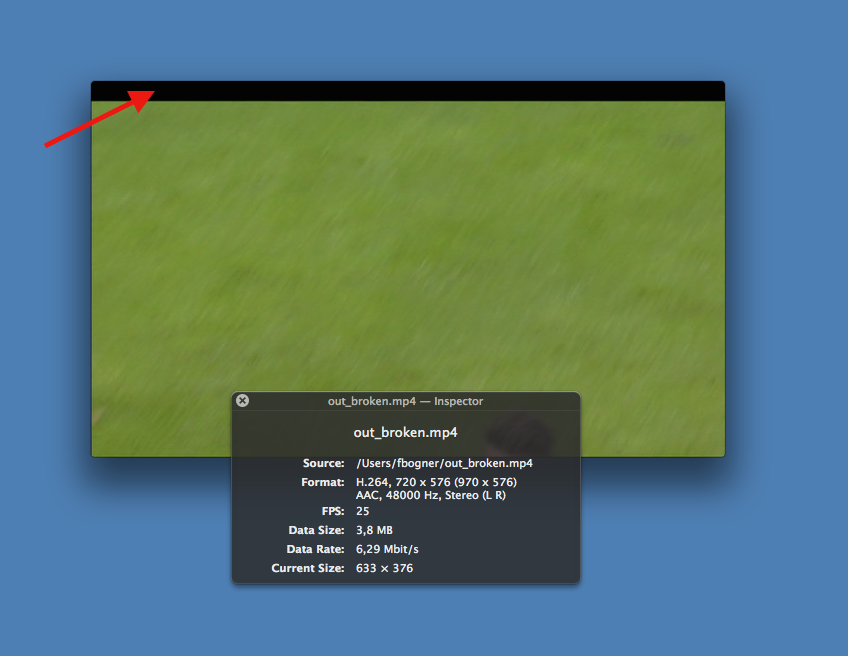
If you try to convert an IMX video wrapped in either a MOV or MXF container using ffmbc without any further options the resulting clip contains a few additional lines (Update: these lines are called VBI) of black pixels at the top. The same result can be observed within VLC. It may be caused by the fact that IMX gets misdetected as MPEG2.

ffmbc and IMX
To solve this problem we use a combination of ffmbc’s video filters. At first we crop off the black pixels, than we ensure that we get a 720×576 PAL resolution and finally we deinterlace the input.

ffmbc -i IMX_Input.mov -vcodec libx264 -acodec aac -strict experimental -b 5120k -vf "crop=720:576:10:42,yadif,scale=720:576" -y H264_Output.mp4

With this command we get the expected H264 proxy with a 5MBit bitrate. However often you have to deal with multiple input formats. To do that efficiently we have to detect IMX files and apply the workaround. I was able to detect them if they were wrapped in MOV containers with the following command:

ffmbc -i IMX_Input.mov 2>&1|grep IMX

By combining the IMX detection and by applying the video filters when necessary we can convert (nearly) all input files automatically.

The only thing left is the detection of IMX videos wrapped in MXF containers. So far I have been unable to solve this with my toolset (ffmpeg, ffmbc and mxfdump). If you find a way please leave a comment.

Aug 052014
 

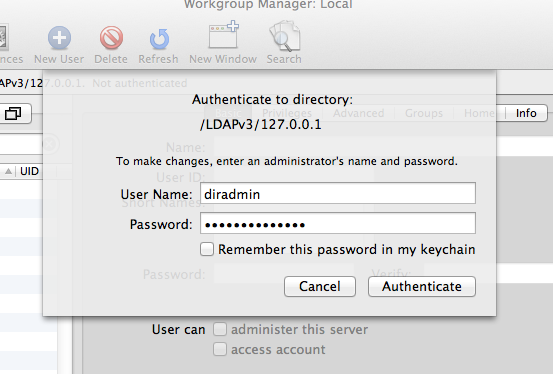
Recently a customer reported that he was unable to add new users to his OS X 10.8 Server. To be precise, he was even unable to login as diradmin to his local OpenDirectory master.

Workgroup Manager

Each login attempted created the following error message:

servermgrd: servermgr_accounts: got error 2100 trying to auth to local LDAP node

After ruling out all the common issues like discussed in “Why Is My OD LDAP Server Stopped & How To Fix It” it was time to move over to the dark side. In this case, one had to know that the auth database of the OD server itself is stored as a Berkeley DB in /var/db/openldap/authdata and that it is most likely damaged. Based on that (and after creating a backup) we can now use db_recover to repair it with the following commands:

sudo serveradmin stop dirserv
sudo db_recover -h /var/db/openldap/authdata
sudo serveradmin start dirserv

After a few seconds you should be able to login as diradmin again.

Aug 032014
 

heroLast week I observed a strange quirks of OS X Mavericks and AVFoundation: When writing a video using AVFoundation data caching is always enabled. Caching by itself provides a huge performance boost by the cost of reliability. Generally this wouldn’t be a problem, because you can easily disable caching by using fcntl and F_NOCACHE. However as AVFoundation does not expose the corresponding file descriptor this is not possible. Now think about the result of the following scenarios:

  1. You write a video file on an external storage while the volume is disconnected
  2. You write a video to a network volume and someone reboots a switch
  3. You write to a local disk and a power outage occurs

Yes, all these issues result in data loss as the cache has to be purged! This is especially problematic as the Unified Buffer Cache can grow up to hundreds of MB. This can result in the loss of several seconds or even minutes of video data.

I had to use all my Google-foo to find the blog post “Hacking the Mac OSX Unified Buffer Cache” that provides a possible solution. The undocumented? fcntl flag F_GLOBAL_NOCACHE allows you to disables the Unified Buffer Cache globally for a specific file. This even works for all already opened file handles. Thereby it is possible to mitigate all the problems outlined above. Stefan Bechtold wrote the command line wrapper UBCUtil that allows you to test the flag without modifying your code.

What a day…