Apr 022012
 

I have already posted about the great bindfs FUSE filesystem.

In this special case we use it as a destination for Avid’s Media Composer. The problem with Avid is, that they use some fcntl calls that are not yet supported by fuse4x. This calls are used to preallocate storage.

When you search around the Web you will find out that fcntl is based on ioctl – therefore it was clear for us to find a FUSE implementation that supports ioctl on Mac OS X. The only current solution is to use fuse4x and Anatol’s (the main developer) “private” kext repository. I built this version, updated bindfs but was still not able to get it working.

After digging in even further, I found the corresponding kernel source file, where the F_PREALLOCATE attribute is handled. With this information I was able to update the fuse4x kext to “support” the VNOP_ALLOCATE VFS interface.

With this patched kext Avid is able to consolidate on a FUSE volume. The sources and a binary packages is available to download at Google Code.
Mar 212012
 

Today a customer called me and told me about a very strange problem. Sometimes they are unable to log in – after the second or third try it works. Whenever this problem occurs the login window reports the following error message:

You are unable to log in to the user account <username> this time. Logging in to the account failed because an error occurred.

After looking at the logs I found the following messages. (The strange characters are rendered correctly!):

AFP_VFS afpfs_mount: /Network/Servers/FQND/very/ long/path/to/Network Profiles/Netw�x�V���Iz��y�V� 
AFP_VFS afpfs_unmount: /Network/Servers/FQND/very/ long/path/to/Network Profiles/Netw��ji�� �G��ji�...

Here are some details about the setup:

  • Mac OS X Leopard Server (10.5.8) configured as OpenDirectory master
  • network home directories
  • DNS properly configured (and tested)
  • Kerberos working (and tested)

After hours of investigating and searching around I found an Apple KB entry titled “Mac OS X Server: Avoid spaces and long names in network home directory name and path“. After checking out the path length everything was clear – THIS IS THE PROBLEM! In the evening I modified the folder structure to meet the 89 character limit and everything went back to normal – everybody is able to login at the first time.

Mar 092012
 

Just a short list with some useful tipps for installing a new Microsoft SBS 2011 Server.

Mar 092012
 

I often have to migrate mailservers therefore it’s important for me to have a tool like imapsync.

Imapsync, as the name suggests, is used to sync a source and a destination imap mailbox. It’s highly customizable and can be scripted using the powerful command line interface.

I don’t want to write a full tutorial (see herehere or here) but instead give you a short overview.

Requirements

Simple usage overview

imapsync --host1 imap.truc.org --user1 foo --password1 secret1 --host2 imap.trac.org --user2 bar --password2 secret2

For further information see the man page.

Problems

This is the most important part of this posting. Here I will list problems that I encountered.

imapsync quits in the middle of a synchronization

This is most likely caused by a broken Mail::IMAPClient library. Try to download a (newer) version here and include it using perl’s “-I” command line parameter

“xx BAD Command Argument Error. 11” is printed

I had this problem once using an Exchange 2011 as the destination. It means that the current message exceeds the maximum message size. See this post for how to fix it.

Mar 062012
 

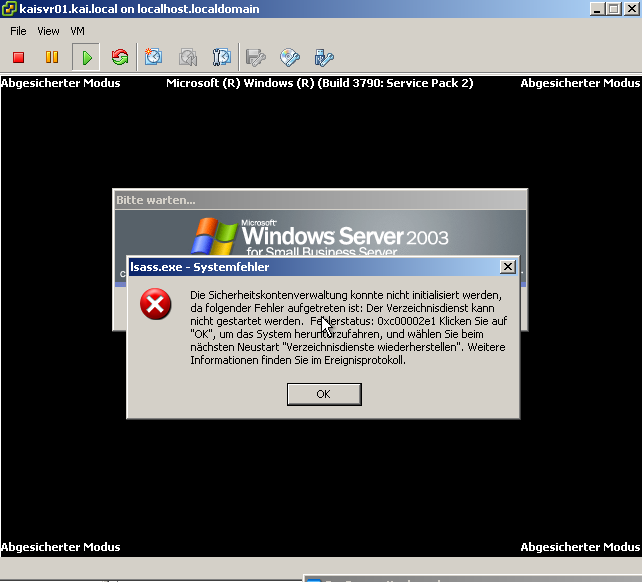
Today I migrated a Microsoft SBS 2003 Server to a VMware ESXi 5.0 host.

At first I tried to convert the running server using the VMware vCenter Converter. It finished quite fast (~40GB in half an hour) over gigabit ethernet and even booted up. But instead of showing the login form, it reported, that the ActiveDirectory could not be started. I tried all the suggested solutions provided by Microsoft’s knowledge base article (KB240655) without success.

Then I used Seagate’s DiscWizard from the Hiren BootCD to create an Acronis disk images and migrated it using the converter. At first it estimated over 5 hours, so I changed some settings (nothing really special) – the next try took only 30! minutes. Additionally this time no error showed up and everything worked as expected!

Fazit: Always do an offline migration – it will save you hours!

Mar 012012
 

We always use QLogic Fibre Channel Switches for our SAN installation. These switches have some options to increase throughput and decrease spikes during large file transfers, namely I/O Stream Guard and Device Scan.

It’s quite important to set this options correct for a good overall performance of the SAN regardless of the used software (XSan, metaSAN, HyperFS, …).

Here’s what you have to use:

Initiators (your clients)

I/O Stream Guard: Enabled
Device Scan: Disabled

Target (your RAIDs)

I/O Stream Guard: Disable
Device Scan: Enabled

Apple also posted a KB article a few years ago about this topic.

Feb 272012
 

It was quite hard for me to find a good resource on how to calculate the IP header checksum.

The RFC 791 only says:

The checksum algorithm is:
The checksum field is the 16 bit one’s complement of the one’s complement sum of all 16 bit words in the header. For purposes of computing the checksum, the value of the checksum field is zero.

I used the implementation of Ken Christensen as a reference and was able to get a valid checksum. You can find my algorithm over at Google Code.

Feb 262012
 

Recently we switched over to VMware ESXi 5.0 for all our new Windows Server installations.

For my first installation I have chosen an HP ProLiant ML350 G6.
After looking up the specs and checking with VMware’s Compatibility Guide everything looked quite straight forward. After installing the machine at the client they started to complain about very very low system performance.

After doing some tests I found the problem at the I/O performance of the RAID 1. Googling around showed up a not widely known problem regarded a not installed RAID controller battery backup (BBWC). After getting the “missing” part and finishing the first loading cycle (which took about 2 hours) everything went back to normal!

Always get a BBWC for your P410i controllers when you want to use VMware ESXi

Feb 212012
 

Mac OS X allows hardlinks on directorys (see stackoverlow) but this has two limitations:

  1. as all hardlinks they work only on one partition
  2. it’s not really supported

With the help of osxfuse and bindfs you can bind a directory to a different folder – like the way you would do it on every other unix based system.

PS: Here’s my patched version (only useful to me): bindfs-1.9